Architecture
How the Faraday platform, API, MCP server, and user interfaces fit together.
Faraday is one platform with several front doors. This page shows what's behind each one, so you can tell which you should be walking through.
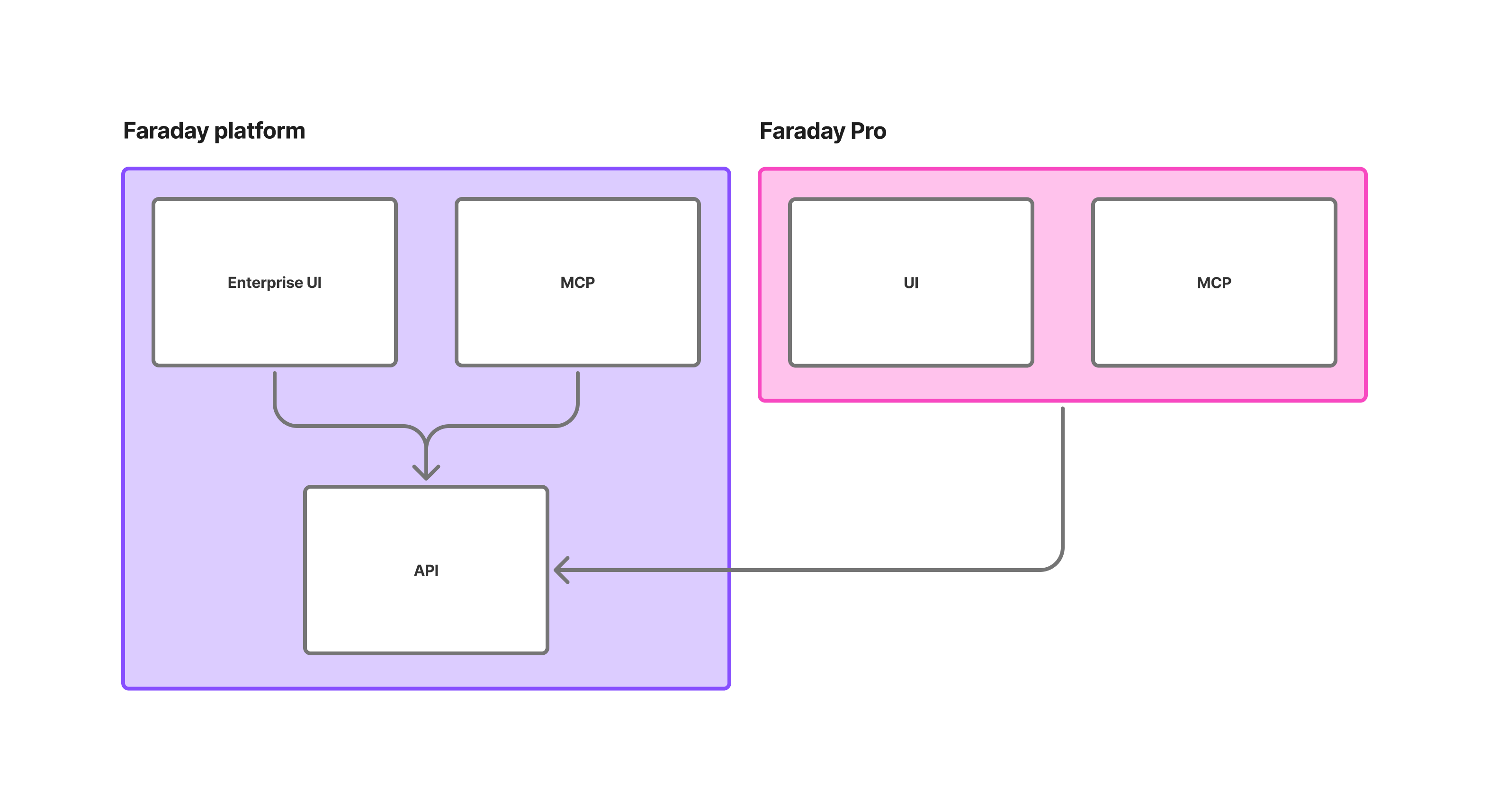
The platform and its API
The Faraday platform is the substance: the Faraday Identity Graph, identity resolution, model training, and the delivery machinery that gets context where it needs to go.
The API is how all of that is reached. This is the important structural fact — everything else in the diagram is a client of the API, including the interfaces we build ourselves. There's no private back channel that the dashboard uses and you can't. When you write against the API directly, you're working at exactly the level the rest of the system works at.
Faraday Enterprise
Faraday Enterprise is the platform's own interface, and it comes in two forms that sit side by side:
- The Enterprise UI — the dashboard at
app.faraday.ai, where you connect data, define cohorts, train models, and configure deployments by clicking rather than by writing requests. - MCP — the agent-facing equivalent, at
mcp.faraday.ai/mcp. Instead of navigating the dashboard, you describe what you want and an AI agent provisions the resources through the same tools.
Both are clients of the platform API, which is why they can do the same things. It's also where you get an API key for that API.
Faraday Pro
Faraday Pro is a separate application built on top of the platform, with its own UI and its own MCP server — and it reaches the platform through the same public API you would.
That's what the diagram is really saying. Pro is not a fork, a lite copy, or a separate pool of data. The graph, the identity resolution, and the models underneath it are the platform's. What Pro supplies is a narrower and more opinionated surface on top: the project, a saved payload you retrieve by lookup, file append, or warehouse connection, billed per matched value.
So the split between the two products isn't a split in the data. It's a split in how much of the platform you're asked to configure, and whether you're doing that alone or with a consultant beside you.
Two MCP servers
Both products are agent-ready, but they expose different servers for different jobs. Point your agent at the one matching the product you're using:
| Server URL | What an agent can do | |
|---|---|---|
| Faraday platform | mcp.faraday.ai/mcp | Configure and operate a whole account — connections, datasets, cohorts, models, deployments |
| Faraday Pro | api.pro.faraday.ai/v1/mcp | Manage projects, browse the catalog, and look people up against a project's payload |
The same goes for API keys: an Enterprise key authenticates against api.faraday.ai, a Pro key against api.pro.faraday.ai. They are not interchangeable.
Faraday is a DAG
Whichever door you come through, the shape of the work behind it is the same.
Faraday is a Directed Acyclic Graph (DAG). You can think of it like a pipeline, flowing from your data, through the Faraday machinery, then out into your application, where you use predictions to improve customer experiences.
Every resource is a node with dependencies pointing back at what it was built from — a deployment depends on a scope, which depends on a cohort, which depends on a dataset. Change something upstream and everything downstream of it rebuilds. In Enterprise you assemble that graph yourself, one resource at a time. In Pro, a project assembles it for you behind the scenes.
Which one should you be using?
- Faraday Pro, if you have contacts and want to know more about them, and you'd rather pick what you want and integrate it yourself than sit through a sales call. Sign up and pay per match.
- Faraday Enterprise, if you want a context consultant alongside the platform, or you need the parts Pro doesn't expose — SaaS integrations, advanced predictions, nearest-location and group-membership context. Talk to sales.
- Either one's API or MCP server, if you're building an application or an agent on top of Faraday. Which one depends on which product you signed up for, not on what you're building.
The Faraday Pro and Faraday Enterprise pages each carry a full feature comparison if you want to see the two side by side.